Privacy
See where the text you type is processed and what's stored on this Mac.
The text you type is processed on your Mac or sent directly to an AI service you connected. Typeside's servers don't receive your text.
At a glance
| Feature | Where it's processed |
|---|---|
| Dictation | Your Mac |
| Polish dictated text | Your Mac |
| Autocomplete | Your Mac |
| Improve, Translate, Summarize | Your Mac (on-device light model) |
| Prompt and skills | Depends on the model you choose (see below) |
Features processed only on this Mac
- Dictation: Both the Apple engine and Whisper turn speech into text on your Mac. Your voice never leaves your Mac and isn't stored.
- Autocomplete, Improve, Translate, and Summarize: Processed by the on-device light model, the model downloaded during setup. They always use this model, so your text never leaves your Mac.
Prompt and skills
Where your text goes depends on the model you choose. To choose a model, see AI models.
| Model | Where your text goes |
|---|---|
| On-device general model | Processed on your Mac. It never leaves your Mac |
| A connected service (OpenAI, Anthropic, and so on) | Sent directly from your Mac to that service. It doesn't go through Typeside's servers |
| Ollama running on your Mac | It never leaves your Mac |
How long a service keeps the text you send, and whether it uses it for training, depends on that service's policy. Check it before you send.
API keys for services are stored only in your Mac's keychain. Typeside doesn't receive your API keys.
Information sent with a request
The following is sent only where your request goes.
- Selected text: Sent along if you run something with text selected.
- App name: Prompt, Shorten, and Expand send the name of the app you're using. Your own skills send it only if you chose it in the skill.
- Window title, screen content, clipboard: Off by default. Only the items you allow in Settings ▸ Prompt are sent, and each skill chooses which of them to send. See Create a skill.
Screen content is only the text your Mac reads from the screen. Screen images are never sent or stored.
Process on this device only
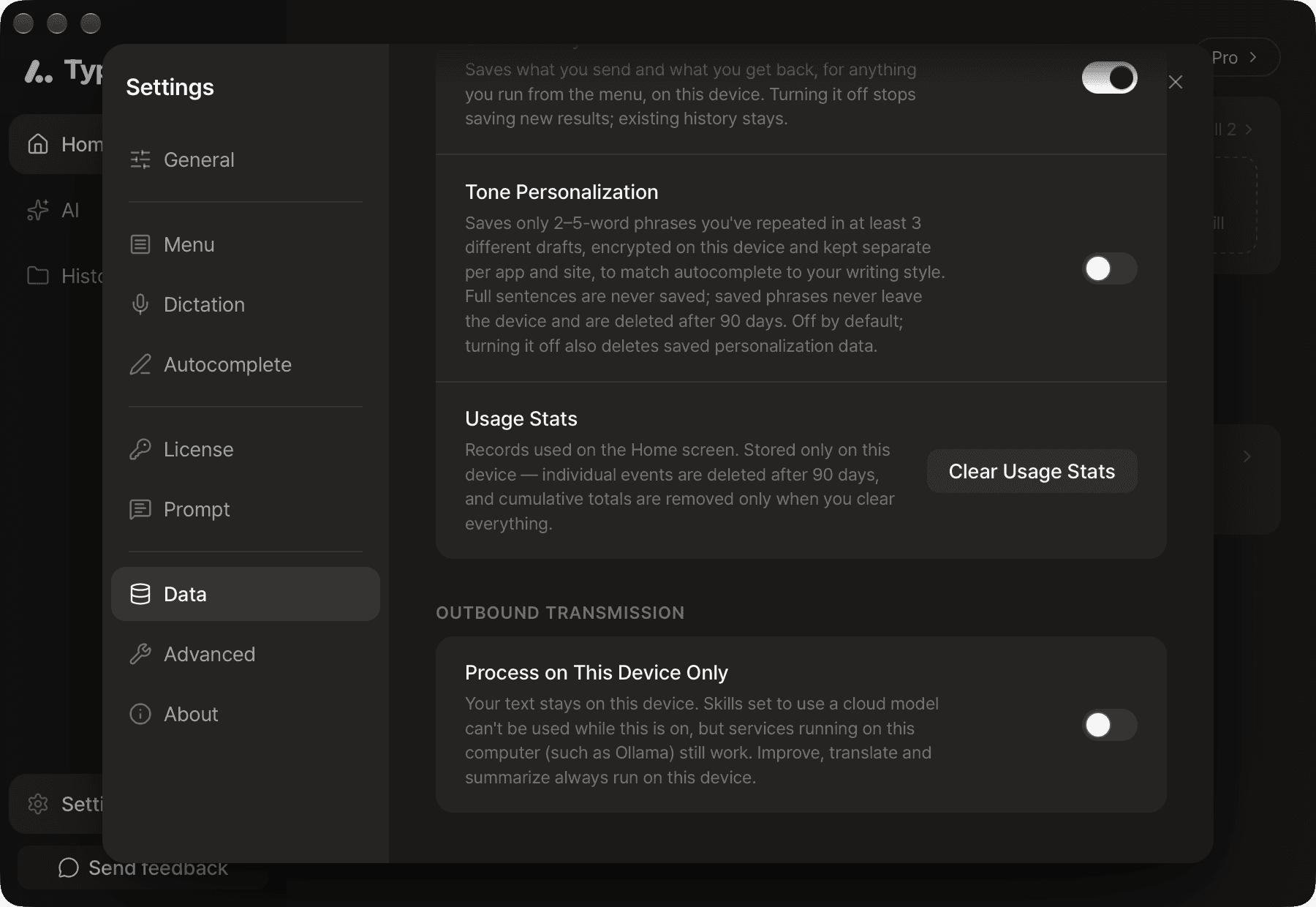
To keep your text from going to outside services, turn on Process on this device only in Settings ▸ Data. It's off by default. If you work with text that can't leave your company, keep it on.
- The on-device light model and on-device general model keep working.
- Services running on your Mac, such as Ollama, keep working.
- Prompt and skills set to use an outside service are locked. Your text isn't sent anywhere else instead.
What's stored on this Mac
The following is stored only on your Mac and isn't sent to Typeside.
- History (on by default): The original text and results of Improve, Translate, and other actions, and your Prompt conversations. Dictated text is saved only when Polish dictated text was applied. Deleted automatically after 90 days. Turn it off with Save history in Settings ▸ Data, and delete saved history from History in the sidebar.
- Tone personalization (off by default, Pro): Only short phrases you've used repeatedly across several documents, encrypted. Whole sentences aren't stored. Deleted automatically after 90 days. Turning off Tone personalization in Settings ▸ Data also deletes the stored data. You can also delete it with Delete data.
- Usage stats (always on): When each feature was used, where it was processed, and character counts, for the numbers on the Home screen. Text, app names, and window titles aren't stored. Delete them with Clear usage stats in Settings ▸ Data.
Connections that carry no text
The app also connects to the internet for the following. None of these connections include your text.
- License checks: Device information is exchanged when you register and check your license.
- Error diagnostics: If the app hits a serious error, it sends information such as the error type and app version. It doesn't include your text, AI results, voice, or email address. On by default; turn it off with Share error diagnostics in Settings ▸ Advanced.
- Updates and model downloads: The app checks for new versions and downloads app updates and AI model files. These requests include standard information such as your IP address.
For the third-party providers we use, the exact items collected, and how long they're kept, see the Privacy Policy.